<assembly.printedpart />
assembly.printedpart adds a mechanical part to an assembly.device. Supply JSCAD JSX with jscad, or an existing model with model, modelUrl, or cadModel. The part has no PCB footprint or schematic symbol.
For a motor mounted to a printed bracket and a controller on the same base, see Advanced Assembly.
Mount a printed spacer between a motor and a board
The assembly below connects NEMA17.backface → SPACER.motor, then SPACER.board → the controller PCB. The spacer has a 4 mm plate, four hollow posts, and a 30 mm center opening. Its total height is 10 mm, including the plate.
The complete example starts with the assembly connections. MotorSpacer defines the printable geometry and its named mounting faces; MotorController forwards mounting props to its underlying board.
import { assembly, jscad } from "tscircuit"
import type { BoardProps } from "@tscircuit/props"

const holeCenters = [-15.5, 15.5].flatMap((x) =>
[-15.5, 15.5].map((y) => [x, y] as const),
)

export default () => (
  <assembly.device>
    <assembly.motor
      name="NEMA17"
      model="nema17_backfaceholes"
      shaftFacingDirection="z-"
    />
    <assembly.printedpart
      name="SPACER"
      jscad={<MotorSpacer height={10} />}
      mountedTo="NEMA17.backface"
      mountFace="motor"
    />
    <MotorController mountedTo="SPACER.board" />
  </assembly.device>
)

function MotorSpacer({ height = 10 }: { height?: number }) {
return (
  <>
    <jscad.subtract>
      <jscad.union>
        <jscad.cuboid size={[42, 42, 4]} center={[0, 0, 2]} />
        {holeCenters.map(([x, y]) => (
          <jscad.cylinder
            key={[x, y].join(",")}
            radius={4}
            height={height}
            center={[x, y, height / 2]}
          />
        ))}
      </jscad.union>
      <jscad.cylinder
        radius={15}
        height={height + 2}
        center={[0, 0, height / 2]}
      />
      {holeCenters.map(([x, y]) => (
        <jscad.cylinder
          key={[x, y].join(",")}
          radius={1.6}
          height={height + 2}
          center={[x, y, height / 2]}
        />
      ))}
    </jscad.subtract>

    {/* Plate underside: local Z=0, facing the motor. */}
    <jscad.rotate angles={[0, Math.PI, 0]}>
      <jscad.rectangle name="motor" size={[42, 42]} reference />
    </jscad.rotate>
    {/* Post tips: local Z=height, facing the PCB. */}
    <jscad.translate offset={[0, 0, height]}>
      <jscad.rectangle name="board" size={[42, 42]} reference />
    </jscad.translate>
  </>
)
}

function MotorController(props: BoardProps) {
return (
  <board
    width="42mm"
    height="42mm"
    thickness="1.6mm"
    routingDisabled
    {...props}
  >
    {holeCenters.map(([x, y]) => (
      <hole
        key={[x, y].join(",")}
        diameter="3.2mm"
        pcbX={x}
        pcbY={y}
      />
    ))}
    {/* Add your controller components and traces here. */}
  </board>
)
}
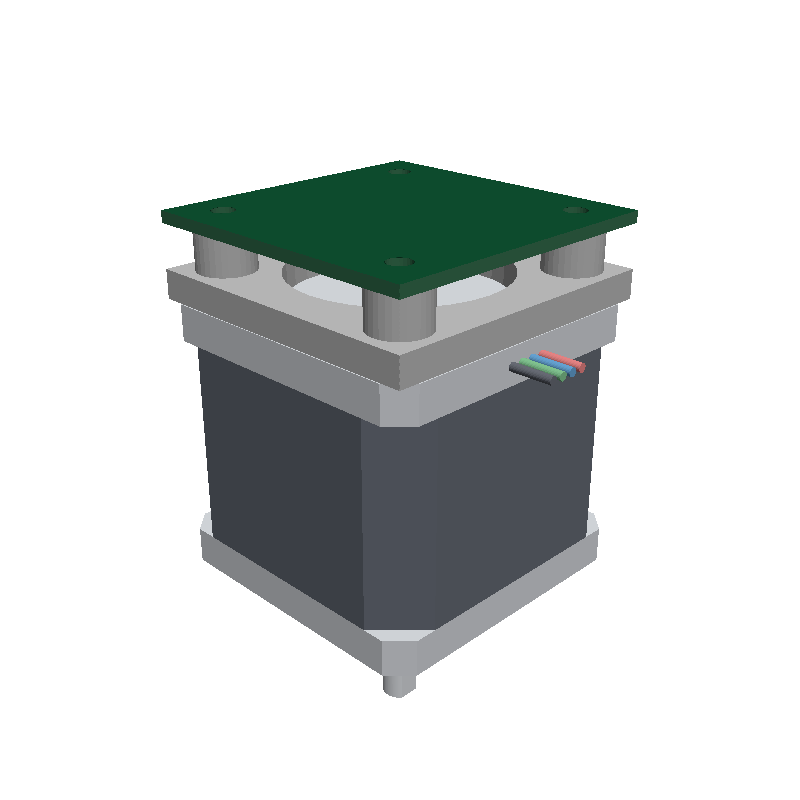
The motor sits below the PCB, with its shaft pointing down. Omitted mountGap values default to zero: the plate touches the motor's backface and the PCB rests on the post tips. Add mountGap="1mm" to the printed part for motor-to-spacer clearance, or to MotorController for spacer-to-PCB clearance.
| Dimension | Value |
|---|---|
| Plate | 42 × 42 × 4 mm |
| Total spacer height | 10 mm; change height to a value greater than 4 mm |
| Posts | Four, 8 mm outside diameter; extend 6 mm beyond the plate |
| Screw holes | 3.2 mm diameter M3 clearance holes through the plate and posts |
| Hole centers | X and Y at ±15.5 mm, giving a 31 × 31 mm pattern |
| Center opening | 30 mm diameter |
nema17_backfaceholes selects a NEMA17 model with open rear holes instead of protruding rear screw heads. Match the rear-hole pattern to your actual motor. The controller here is a board with mounting holes; replace its contents with your circuit, or pass the same mounting props through your existing controller component.
Name a mounting face in JSCAD
A <jscad.rectangle name="…" reference /> marks a mounting face. It adds no printable material and is removed from the rendered model. Place reference rectangles alongside the solid geometry in a fragment, then move and rotate them with JSCAD transforms.
| Reference in the example | Position in the part | Outward direction |
|---|---|---|
motor | Plate underside at Z = 0 | −Z, using a half-turn around Y |
board | Post tips at Z = height | +Z, the rectangle's default direction |
The rectangle's center is the attachment point, its local +Z is the outward direction, and its local +X controls the in-plane alignment. JSCAD dimensions are in millimetres and rotation angles are in radians. Reference names must be unique within the part.
On the printed part, mountedTo="NEMA17.backface" chooses the target face and mountFace="motor" chooses its own face. Supply these two props together. The faces meet with opposing outward directions and aligned in-plane X directions. A board only needs mountedTo="SPACER.board"; it does not need a mountFace prop.
Mounting keeps the PCB's existing XY layout and its center plane at Z = 0, moving the attached parts to meet it. Board mounting requires a target face parallel to XY; motor–spacer–board chains support shaft directions z+ and z-. One board can anchor each connected chain of parts. Targets resolve by name inside the same assembly.device, including targets declared later.
Use an existing CAD model
Provide exactly one of jscad, model, modelUrl, or cadModel:
<assembly.printedpart name="SPACER" modelUrl="./spacer.stl" />
<assembly.printedpart name="BRACKET" model="./bracket.glb" />
<assembly.printedpart
  name="COVER"
  cadModel={{
    glbUrl: "./cover.glb",
    positionOffset: { x: 0, y: 0, z: 12 },
  }}
/>
Use your own asset paths. model accepts a modelprinter/footprinter specification or a model URL. cadModel accepts the existing CAD model formats and transforms described in mounting 3D models.
Imported models do not automatically provide named mounting faces. For the face-based mounting shown above, author the reference rectangles through the jscad prop.
Printed part properties
| Property | Type | Description |
|---|---|---|
name | string | Required name used in references such as SPACER.board. |
displayName | string | Optional display label. |
jscad | ReactElement | JSCAD JSX from jscad-fiber, available as jscad from tscircuit. |
model | string | Model specification or model URL. |
modelUrl | string | URL or asset path for an existing CAD model. |
cadModel | CadModelProp | Existing CAD model configuration or CAD JSX. |
mountedTo | string | Target part and face, such as NEMA17.backface. |
mountFace | string | This part's named reference face; supply together with mountedTo. |
mountGap | string | number | Nonnegative surface clearance in mm or a unit string. Defaults to zero; requires mountedTo. |
JSCAD JSX can contain synchronous function components, fragments, and arrays. Hooks, async components, and raw JSCAD kernel geometry are not supported in the jscad prop.