<assembly.explosion.stage />
assembly.explosion.stage names a step in an exploded assembly view. Put stages inside an assembly.device or assembly.subassembly, with one or more assembly.explosion.move children.
Import assembly from @tscircuit/core. Use assembly.explosion.stage and assembly.explosion.move directly; there is no <assembly.explosion> wrapper.
Lift the cover and bolts together
The first stage below lifts the cover and every part targeted by remove-bolts. The second stage then pulls the bolts farther out. The PCB stays fixed. The cylinders stand in for the two fasteners in this small example.
import { assembly } from "@tscircuit/core"
import { Cuboid } from "jscad-fiber"

export default () => (
  <assembly.device name="case">
    <board width="30mm" height="24mm" />
    <assembly.printedpart
      name="cover"
      color="#3283b5"
      jscad={<Cuboid size={[28, 22, 2]} center={[0, 0, 6]} />}
    />
    {[-10, 10].map((x, i) => (
      <assembly.part
        key={i}
        name={`bolt${i + 1}`}
        cadModel={{
          jscad: { type: "cylinder", radius: 1.5, height: 8 },
          positionOffset: { x, y: 0, z: 4 },
        }}
      />
    ))}
    <assembly.explosion.stage name="lift-cover">
      <assembly.explosion.move
        targetRefs={["cover", "remove-bolts"]}
        offZ="12mm"
      />
    </assembly.explosion.stage>
    <assembly.explosion.stage name="remove-bolts" prevStageRef="lift-cover">
      <assembly.explosion.move targetRefs="bolt1, bolt2" offZ="10mm" />
    </assembly.explosion.stage>
  </assembly.device>
)
Targeting another stage selects its members; it does not execute that stage's instructions or change playback order. A stage can be referenced before its declaration, as remove-bolts is here.
Stage properties
| Property | Description |
|---|---|
name | Required stage name, unique in its assembly scope. |
prevStageRef | Stage that must finish before this one. |
nextStageRef | Stage that must start after this one. |
children | Ordered assembly.explosion.move elements. |
Ordering references resolve relative to the owning assembly. Use a qualified path, such as case.remove-bolts, when addressing another scope. Stages without ordering constraints follow stable depth-first TSX order. Unknown references, duplicate stage paths, ordering cycles, and cyclic stage membership are errors.
Play the exported Circuit JSON
Core renders the assembled geometry and explosion program together:
import { Circuit } from "@tscircuit/core"
import { CadViewer } from "@tscircuit/3d-viewer"
import Assembly from "./assembly"

const circuit = new Circuit()
circuit.add(<Assembly />)
await circuit.renderUntilSettled()
const circuitJson = circuit.getCircuitJson()

// The viewer only needs the generated JSON.
;<CadViewer circuitJson={circuitJson} />
In the 3D viewer, right-click and select Advanced → Exploded view…. Scrub the slider through each stage, use Reset to return to the assembled pose, or close the panel to restore it. Use the stage selector above to compare rendered poses, or click an image to rotate that pose. The full 3D viewer also supports continuous scrubbing.
The JSON contains cad_explosion_stage records with resolved order and explicit member IDs, plus cad_explosion_move records with targets and world-space translations. A live TSX tree or a separate exploded JSON file is not needed for playback.
Use the same supported core version for both the TSX imports and the Circuit renderer. A CLI that bundles an older renderer can build the assembled geometry while omitting the explosion records; check the exported JSON for both record types.
Sample a stage or export each frame
import { getCircuitJsonAssemblyExplosion } from "@tscircuit/core"
import {
  convertCircuitJsonToGltf,
  getAssemblyExplosionFrames,
} from "circuit-json-to-gltf"

const halfway = getCircuitJsonAssemblyExplosion(circuitJson, {
  throughStageRef: "case.remove-bolts",
  stageProgress: 0.5,
})

for (const frame of getAssemblyExplosionFrames(circuitJson)) {
  const glb = await convertCircuitJsonToGltf(circuitJson, {
    format: "glb",
    explosion: frame.explosion,
  })
  // Save/render glb, keep one camera, and label it with frame.name.
}
stageProgress ranges from 0 to 1, dividing the selected stage equally among its sequential moves. Earlier stages stay complete. Each evaluation starts from the original assembled positions, so backward scrubbing does not accumulate movement. Derived pose JSON omits the instructions to prevent applying them twice; keep the original document for further playback.
getAssemblyExplosionFrames returns the assembled frame and every completed stage in order. Each exported GLB is a static pose, not an animation track.
Render explosion images in CircuitPreview
Pass explosion={{ throughStageRef: "case.remove-bolts", stageProgress: 0.5 }} for one pose, or explosionStages for a named image sequence:
<CircuitPreview
  code={assemblyTsx}
  circuitJson={exportedCircuitJson}
  defaultView="3d"
  explosionStages={[
    { name: "Assembled" },
    { name: "Lift cover", explosion: { throughStageRef: "case.lift-cover" } },
    { name: "Remove bolts", explosion: { throughStageRef: "case.remove-bolts" } },
  ]}
/>
Each selected image and its rotatable model use the same pose. The image service accepts explosion_stage and explosion_progress for 3D PNG, SVG, and GLB output. Omit both for the assembled pose. See the image service API.
Movement guides are included automatically when exporting an exploded pose from the original Circuit JSON. There is no showExplosionLines prop to add to the TSX. Keep the original cad_explosion_stage and cad_explosion_move records when requesting images so the renderer can derive the guides as well as the displaced parts.
Real RP2040 / NEMA17 assembly
This example uses the routed RP2040 motor controller, a NEMA17, four spacers, bolts, and a cover. The cover and bolts first lift together, followed by separate bolt, motor, and spacer removal. The preview renders its original TSX-generated Circuit JSON. Step through each completed stage or the halfway bolt-removal pose; click the image to rotate it.
The overview below pairs the authored stages with all six poses:
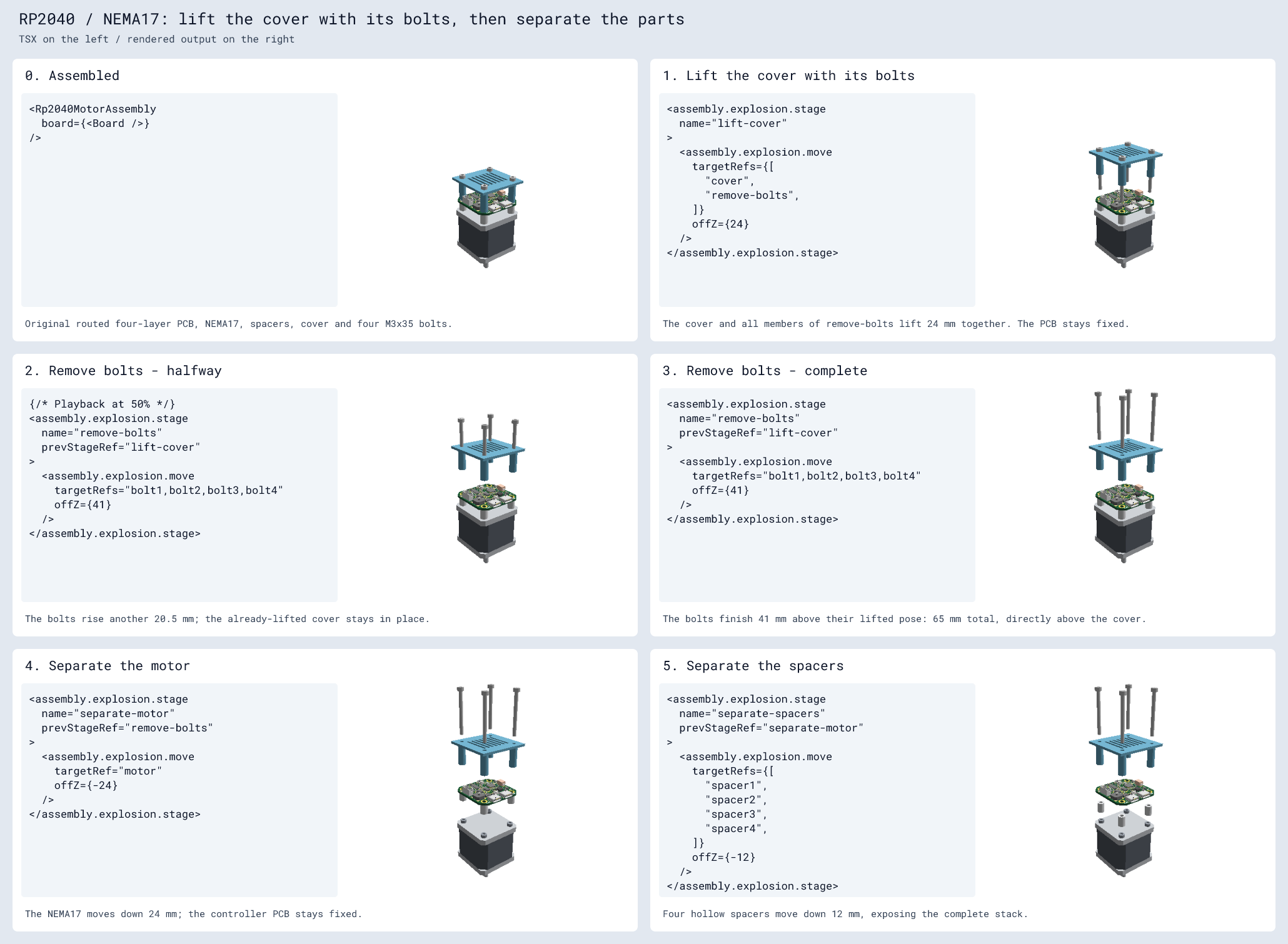
The complete TSX and reproduction instructions preserve the original board's routed copper and document its pinned build dependencies.
Supported versions and limits
Use @tscircuit/core 0.0.2234+, circuit-json 0.0.539+, and @tscircuit/3d-viewer 0.0.637+. Native GLTF stage export requires circuit-json-to-gltf 0.0.159+.
For automatic movement-guide overlays in a local renderer, use circuit-json-to-gltf 0.0.160+ and poppygl 0.0.38+. The hosted image service used by CircuitPreview includes this support.
Explosion moves translate mechanical CAD and reference surfaces. Targets containing PCB or cable geometry are rejected, and rotation instructions are not supported. Guide lines show the requested motion; an exploded image does not verify assembly clearance. Continuous collision diagnostics are being added separately in core #5011.