<assembly.drawing.dimension />
Place assembly.drawing.dimension inside an assembly.drawing.partview to measure its selected geometry. Labels report physical model distances in millimetres, independent of the viewport size or drawing scale. Dimension lines and witness lines are placed automatically.
The examples use @tscircuit/core 0.0.2209 and @tscircuit/props 0.0.712 or newer, including hole references and inferred anchors.
PCB holes and board edges
Use fromRef and toRef to measure between mounting-hole or plated-hole centers. Set axis="x" for horizontal separation or axis="y" for vertical separation in the drawing view.
This 50 × 30 mm board has hole centers separated by 30 mm horizontally and 14 mm vertically. The left edge of the drawing is 8 mm from H1's center. widthOfView and heightOfView measure the board's overall 50 mm and 30 mm extents.
import { assembly } from "@tscircuit/core"

export default () => (
  <assembly.device>
    <board name="carrier" width={50} height={30} routingDisabled>
      <hole name="H1" diameter={3} pcbX={17} pcbY={8} />
      <platedhole name="H2" shape="circle"
        holeDiameter={3} outerDiameter={5} pcbX={-13} pcbY={-6} />
    </board>
    <assembly.drawing.page name="pcb-dimensions" width={210} height={160}>
      <assembly.drawing.partview
        name="plan" partRef=".carrier" direction="z+"
        width={100} height={65} centerX={-10} centerY={15}
      >
        <assembly.drawing.dimension name="hole-spacing-x"
          fromRef=".H1" toRef=".H2" axis="x" />
        <assembly.drawing.dimension name="hole-spacing-y"
          fromRef=".H1" toRef=".H2" axis="y" />
        <assembly.drawing.dimension name="left-edge-to-hole"
          fromRef=".carrier" fromAnchor="left" toRef=".H1" axis="x" />
        <assembly.drawing.dimension name="board-width" widthOfView />
        <assembly.drawing.dimension name="board-height" heightOfView />
      </assembly.drawing.partview>
      <assembly.drawing.titleblock title="PCB HOLE SPACING AND EDGE OFFSET" />
    </assembly.drawing.page>
  </assembly.device>
)
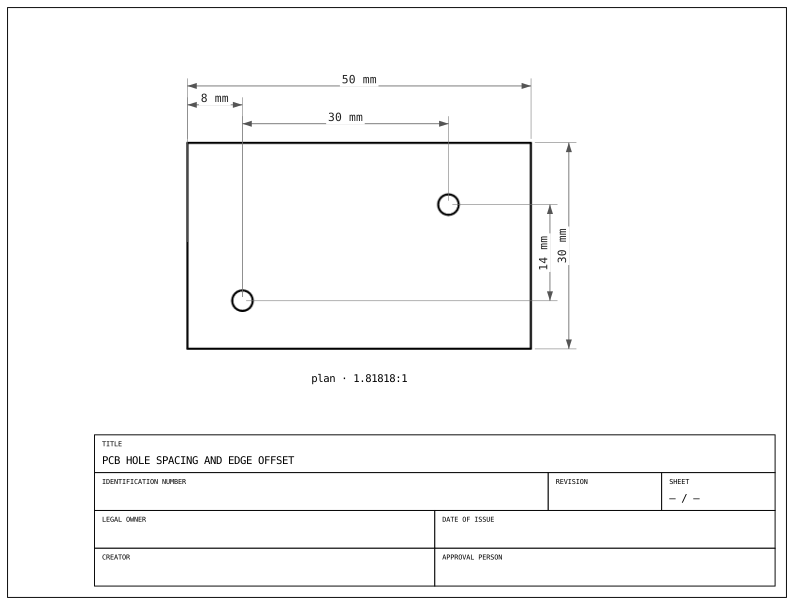
The left-edge-to-hole dimension explicitly selects the board's left edge with fromAnchor="left". Anchors and axes are relative to the drawing view, so left/right can differ from PCB X coordinates when viewed from another direction. PCB hole references represent centers; they do not accept edge anchors or measure drill diameter.
Optional anchors and axis inference
You can omit fromAnchor and toAnchor:
- Two separate holes or outlines use their centers.
- When one reference's projected bounds enclose the other, the enclosing reference uses its nearest edge. The other reference uses its center.
- With
axis="x", the inferred edge is left or right. Withaxis="y", it is top or bottom. - Without
axis, an enclosing reference uses the nearest edge across both axes. Otherwise, the larger horizontal or vertical separation chooses the axis; ties choose X. This measures axis separation, not diagonal distance.
For the PCB example above, these dimensions measure 8 mm and 7 mm respectively:
// Nearest left/right edge to H1, measured horizontally: 8 mm.
<assembly.drawing.dimension fromRef=".carrier" toRef=".H1" axis="x" />

// Nearest edge in either direction: 7 mm vertically.
<assembly.drawing.dimension fromRef=".carrier" toRef=".H1" />
Use an explicit anchor when you need a particular edge, including the farther edge. fromAnchor="center" or toAnchor="center" overrides edge inference to measure from the reference's center. Explicit edge anchors use projected bounding-box edge midpoints; inferred edge anchors align the witness point with the opposite reference's center. For irregular outlines, these are bounding-box measurements, not shortest distances to a contour.
Named CAD holes and outlines
Name features in the model where you construct them, then reference them as ".part > .feature". Here topOutlineName names the plate rim and the two bore outlines before subtraction. Names must be unique within the model.
import { assembly } from "@tscircuit/core"
import { ExtrudeLinear, Polygon, Rectangle, Subtract, Translate } from "jscad-fiber/model"

const circlePoints = (radius: number): [number, number][] =>
  Array.from({ length: 32 }, (_, i) => [
    radius * Math.cos(i * Math.PI / 16),
    radius * Math.sin(i * Math.PI / 16),
  ])

function Plate() {
  return (
    <Subtract>
      <ExtrudeLinear height={4} topOutlineName="rim">
        <Rectangle size={[50, 30]} />
      </ExtrudeLinear>
      <Translate offset={[17, 8, 0]}>
        <ExtrudeLinear height={4} topOutlineName="H1">
          <Polygon points={circlePoints(1.5)} />
        </ExtrudeLinear>
      </Translate>
      <Translate offset={[-13, -6, 0]}>
        <ExtrudeLinear height={4} topOutlineName="H2">
          <Polygon points={circlePoints(2.5)} />
        </ExtrudeLinear>
      </Translate>
    </Subtract>
  )
}

export default () => (
  <assembly.device>
    <assembly.printedpart name="plate" jscad={<Plate />} />
    <assembly.drawing.page name="cad-dimensions" width={210} height={160}>
      <assembly.drawing.partview
        name="plan" partRef=".plate" direction="z+"
        width={100} height={65} centerX={-10} centerY={15}
      >
        <assembly.drawing.dimension name="bore-span" edgeRef=".plate > .H1" />
        <assembly.drawing.dimension name="hole-spacing"
          fromRef=".plate > .H1" toRef=".plate > .H2" axis="x" />
        <assembly.drawing.dimension name="edge-to-hole"
          fromRef=".plate > .rim" toRef=".plate > .H1" axis="x" />
        <assembly.drawing.dimension name="nearest-edge"
          fromRef=".plate > .rim" toRef=".plate > .H1" />
      </assembly.drawing.partview>
      <assembly.drawing.titleblock title="NAMED CAD HOLES AND OUTLINE" />
    </assembly.drawing.page>
  </assembly.device>
)
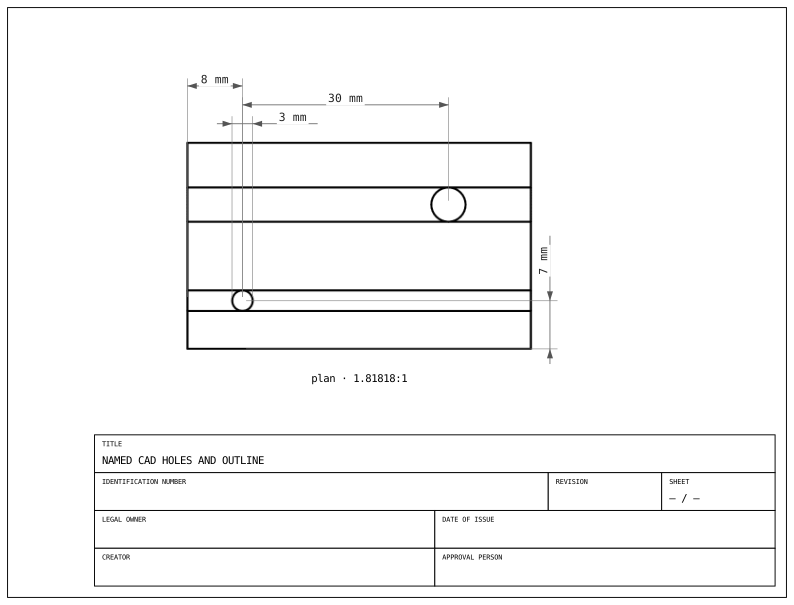
The named-hole references measure 30 mm between centers. The rim-to-H1 dimension measures 8 mm with axis="x", or 7 mm to the nearest edge when the axis is omitted. The edgeRef=".plate > .H1" dimension measures the bore outline's 3 mm projected span.
edgeRef measures one named feature along its larger projected extent (X on ties). A closed outline measures its span, not its perimeter. The feature must exist in the model; selectors do not invent edges or identify arbitrary mesh triangles. CAD outline anchors use projected bounds, with center meaning the bounding-box center.
Properties
| Property | Description |
|---|---|
name | Optional identity for the dimension. Does not set its label or formatting. |
widthOfView | Measure the selected geometry's horizontal extent in the view. |
heightOfView | Measure the selected geometry's vertical extent in the view. |
edgeRef | Selector for exactly one model-defined named edge or outline in the view's selected geometry. |
fromRef, toRef | Paired selectors for PCB holes, plated holes, boards, or named CAD features. Supply both. Each must match exactly one reference in the view's selected geometry. |
fromAnchor, toAnchor | Optional overrides: "center", "left", "right", "top", or "bottom". PCB holes support only "center". Require paired references. |
axis | Optional "x" or "y" measurement axis in the drawing view. Requires paired references. |
Choose exactly one measurement target: widthOfView, heightOfView, edgeRef, or paired fromRef/toRef. Put width and height on separate dimension elements. Setting a boolean target to false does not select it.
In a section view, extent dimensions measure retained geometry. Referenced anchors must lie in the retained section. Missing or ambiguous selectors and zero projected measurements are errors. PCB reference anchors on folded boards are not yet supported.
Labels, units, precision, offsets, and line placement are automatic; there are no props to override them. Dedicated diameter/radius, angular, tolerance, and GD&T annotations are not currently supported.
Export the enclosing sheet with tsci export --drawing, just like any other drawing page.