Distributing tscircuit Libraries
Overview
tscircuit libraries are typically distributed from a published package page on tscircuit.com. In many cases you want the package to stay private while still allowing downstream tools and users to install the generated distribution files.
You can do that by turning on Enable Public Dist in the package settings. This keeps the package private while making the built distribution artifacts publicly fetchable, which means they can be installed without authorization.
When to Enable Public Dist
Enable Public Dist when:
- You want to keep the package itself private on tscircuit.com
- You still want consumers to install the package's built outputs
- You need unauthenticated access for package distribution flows
This is especially useful for library distribution workflows where the install step needs to succeed without a signed-in tscircuit session.
How to Enable Public Dist
- Open your package page on tscircuit.com.
- Go to the package Settings page.
- Turn on Enable Public Dist.
- Save the setting if prompted.
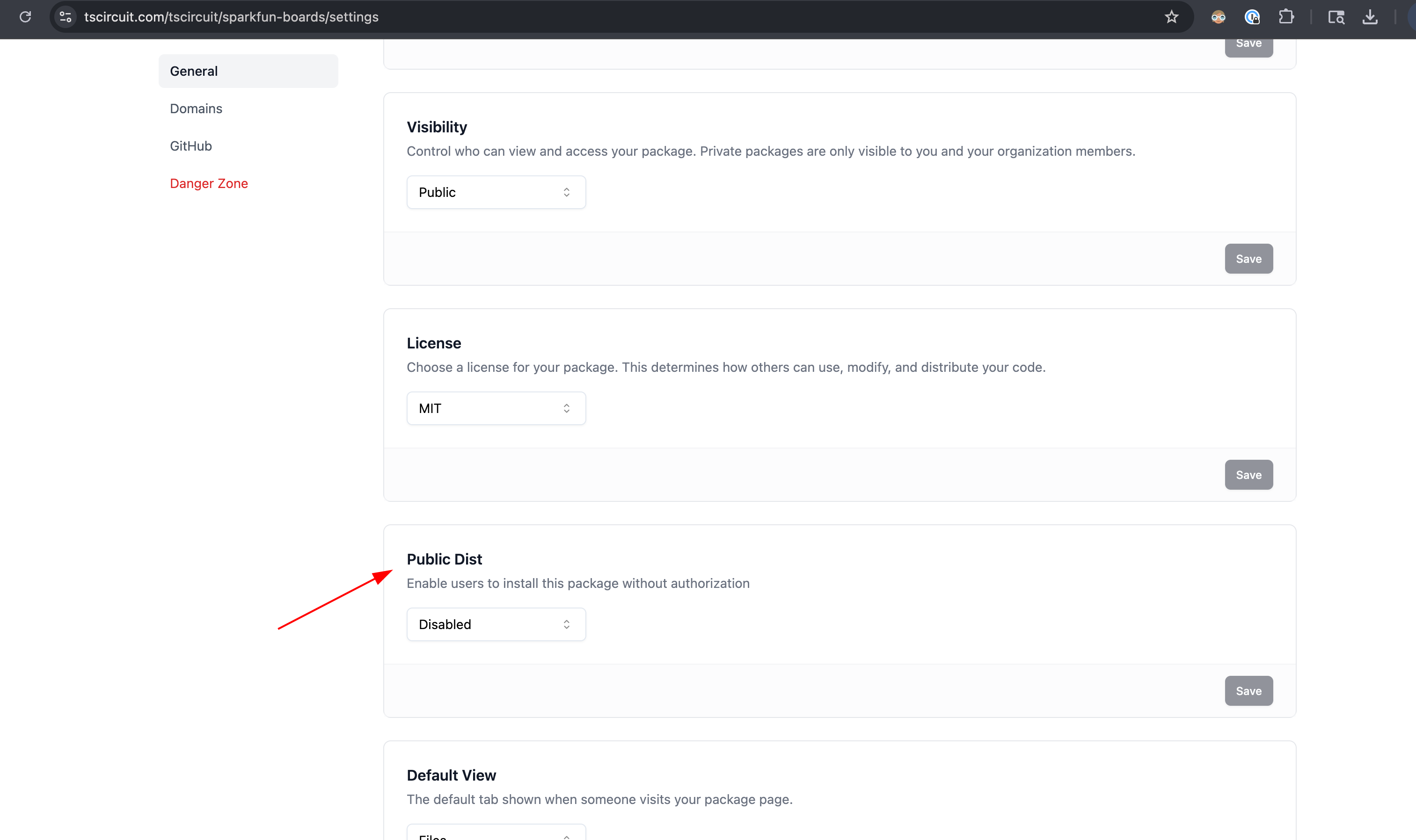
The package settings page includes an Enable Public Dist option for exposing distribution artifacts without requiring authorization.
Result
After Enable Public Dist is turned on, the package's distribution artifacts can be installed without authorization even if the package remains private. Use this when you want private package management with public, installable build outputs.