<assembly.drawing.explosionview />
assembly.drawing.explosionview places an exploded view inside an assembly.drawing.page. Its stageRef selects an assembly.explosion.stage and inherits the stage's assembly.explosion.move instructions. Author movement once in those stages; the drawing has no moves prop.
Available in tscircuit@0.0.3187 and later.
Fidget-counter spinner
This example uses the circular-cap models from rushabhcodes/fidget-counter 1.0.31, plus its published board outline, mounting holes, and fitted component models. The JSON file contains drawing geometry, not a routable electrical design.
The first stage lifts the cap, bearing, and encoder magnet together. The second separates the cap and magnet further. The drawing shows that cumulative pose, an assembled view with factor={0}, and a reusable rotor subassembly selected with partview.
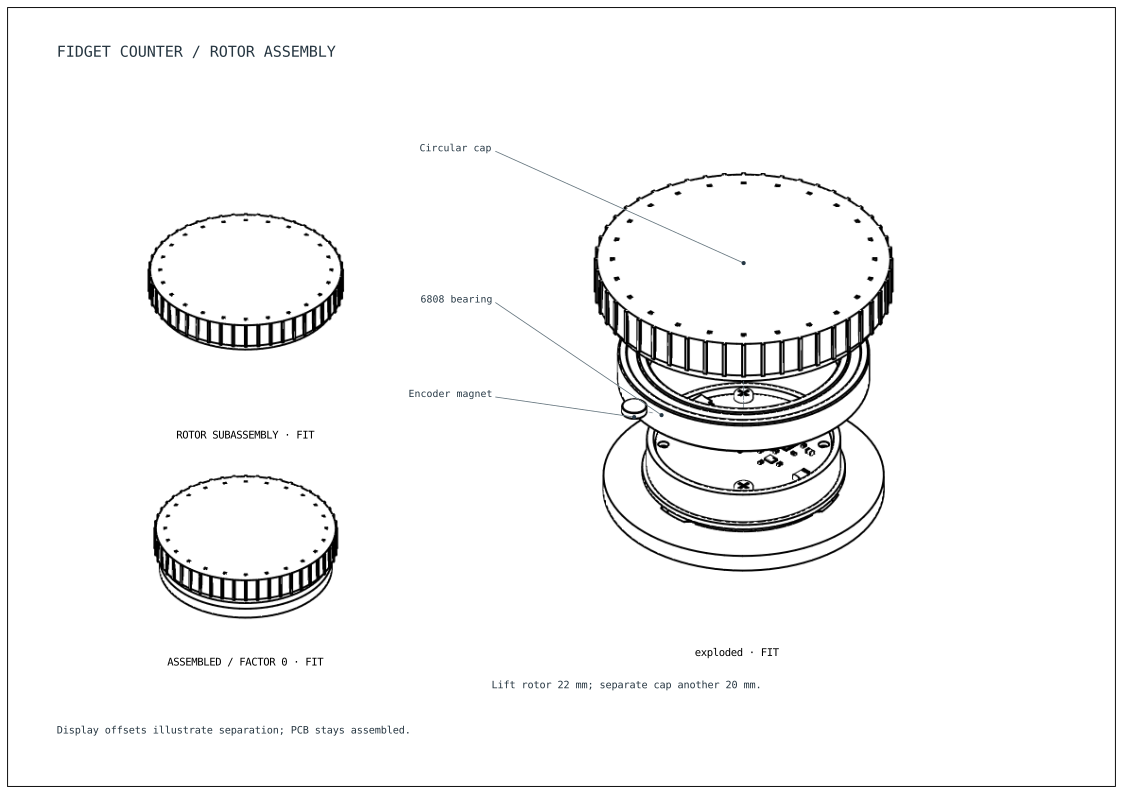
import { assembly } from "@tscircuit/core"
import pcba from "./pcba.json"

// Pinned mechanical models from rushabhcodes/fidget-counter@1.0.31.
const modelUrl = (file: string) =>
  `https://api.tscircuit.com/package_files/download?package_release_id=897e68ca-ae6e-40bb-9c18-0a1cb543a604&file_path=mechanical/Circuit_Models/${file}.glb`

export default () => (
  <assembly.device name="FIDGET">
    <board
      name="PCBA"
      width={pcba.board.width}
      height={pcba.board.height}
      thickness={pcba.board.thickness}
      outline={pcba.board.outline}
    >
      {pcba.holes.map((hole, i) => (
        <hole key={i} diameter={hole.diameter} pcbX={hole.x} pcbY={hole.y} />
      ))}
    </board>
    {pcba.components.map((part) => (
      <assembly.cadassembly
        key={part.name}
        name={part.name}
        cadModel={part.cadModel}
      />
    ))}
    {[
      "Stationary_Base",
      "Cell",
      "MagSafe_Ring",
      "PCB_Fasteners",
      "Bearing_6808",
      "Magnet",
      "Cap_circular",
    ].map((name) => (
      <assembly.cadassembly
        key={name}
        name={name}
        cadModel={{
          glbUrl: modelUrl(name),
          modelUnitToMmScale: 1,
          modelOriginPosition: { x: 0, y: 0, z: 0 },
          positionOffset: { x: 0, y: 0, z: -11.1 },
        }}
      />
    ))}
    <assembly.explosion.stage name="lift-rotor">
      <assembly.explosion.move
        targetRefs="Cap_circular, Bearing_6808, Magnet"
        offZ="22mm"
      />
    </assembly.explosion.stage>
    <assembly.explosion.stage name="separate-rotor" prevStageRef="lift-rotor">
      <assembly.explosion.move targetRefs="Cap_circular" offZ="20mm" />
      <assembly.explosion.move targetRefs="Magnet" offX="32mm" />
    </assembly.explosion.stage>
    <assembly.drawing.stage
      name="rotor"
      partRefs={[".Cap_circular", ".Bearing_6808", ".Magnet"]}
    />
    <assembly.drawing.page
      name="fidget-explosion"
      size="iso_a4"
      anchorAlignment="bottom_left"
    >
      <assembly.drawing.note
        text="FIDGET COUNTER / ROTOR ASSEMBLY"
        paperX={15}
        paperY={195}
        fontSize={4}
      />
      <assembly.drawing.explosionview
        name="exploded"
        stageRef="FIDGET.separate-rotor"
        direction="isometric"
        centerX={195}
        centerY={110}
        width={130}
        height={140}
        showTrails
      >
        <assembly.drawing.partlabel
          text="Circular cap"
          partRefs={[".Cap_circular"]}
          anchor={{ x: 0, y: 0, z: 4.5 }}
          xOffsetFromViewCenter={-65}
          yOffsetFromViewCenter={60}
        />
        <assembly.drawing.partlabel
          text="6808 bearing"
          partRefs={[".Bearing_6808"]}
          anchor={{ x: 24, y: 0, z: -2 }}
          xOffsetFromViewCenter={-65}
          yOffsetFromViewCenter={20}
        />
        <assembly.drawing.partlabel
          text="Encoder magnet"
          partRefs={[".Magnet"]}
          anchor={{ x: 0, y: 0, z: 1.5 }}
          xOffsetFromViewCenter={-65}
          yOffsetFromViewCenter={-5}
        />
      </assembly.drawing.explosionview>
      <assembly.drawing.partview
        name="rotor-detail"
        displayName="ROTOR SUBASSEMBLY"
        stageRef=".rotor"
        direction="isometric"
        centerX={65}
        centerY={135}
        width={80}
        height={75}
      />
      <assembly.drawing.explosionview
        name="assembled"
        displayName="ASSEMBLED / FACTOR 0"
        stageRef="separate-rotor"
        factor={0}
        direction="isometric"
        centerX={65}
        centerY={65}
        width={80}
        height={55}
      />
      <assembly.drawing.note
        text="Lift rotor 22 mm; separate cap another 20 mm."
        viewRef=".exploded"
        xOffsetFromViewCenter={-65}
        paperY={28}
      />
      <assembly.drawing.note
        text="Display offsets illustrate separation; PCB stays assembled."
        paperX={15}
        paperY={16}
      />
    </assembly.drawing.page>
  </assembly.device>
)
The PCB stays assembled. The source model's press-fit bearing produces a non-fatal collision diagnostic when lifted through the base; tsci build --ignore-errors still exports this drawing example. See the original project's assembly instructions for the physical build.
Properties
| Property | Description |
|---|---|
stageRef | Required explosion-stage name, such as "separate-rotor" or the qualified "FIDGET.separate-rotor". Resolves in the owning assembly. |
factor | Separation multiplier from 0 to 1; default 1. 0 shows the assembled pose. |
showTrails | Draw depth-tested movement guides. Default false. |
name, displayName | View identity and optional printed caption. |
direction | Required: "x+", "x-", "y+", "y-", "z+", "z-", or "isometric". |
width, height | Required viewport size on paper, in mm or distance strings. |
centerX, centerY | Center relative to the page's anchorAlignment; default 0 on unconstrained axes. |
leftOfRef, rightOfRef, aboveRef, belowRef | Place beside another view on the same page, using selectors such as ".assembled". |
showHiddenEdges, section | The same hidden-edge and CAD-world section controls as partview. Sections cut the posed geometry. |
children | dimension, partlabel, and note annotations. |
The selected explosion stage determines its owning assembly's visible geometry, including stationary parts and boards. Earlier ordered stages are included. factor scales the complete resolved translation from assembled placement; it is not the playback progress of just the last stage.
stageRef here names an explosion stage, not an assembly.drawing.stage selector. To draw an assembled subset, use partview stageRef. Explosion views do not accept partRef.
Paper placement follows the same rules as part views: positive X is right and positive Y is up. Labels follow their selected parts, and dimensions measure the posed geometry. Views do not change the underlying assembly's 3D placement.