<assembly.drawing.partlabel />
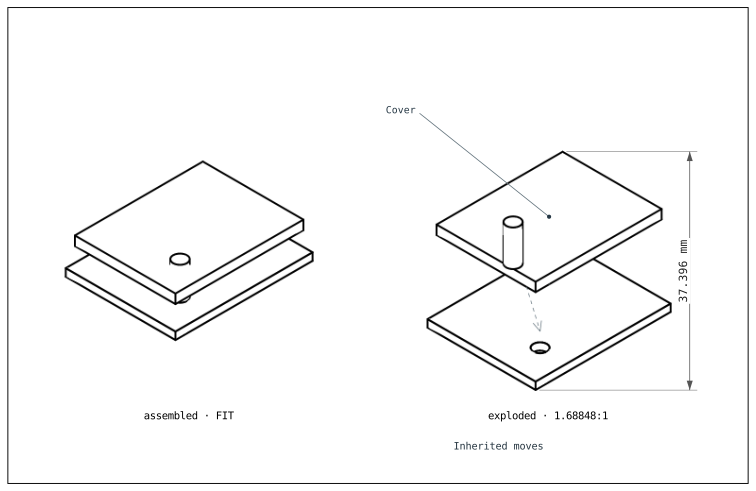
Nest assembly.drawing.partlabel in a partview or explosionview. It draws text with a leader from an explicit point on the selected parts. The cover label below follows the cover's exploded position.
import { assembly } from "@tscircuit/core"
export default () => <assembly.device name="case">
  <board name="carrier" width={30} height={24}><hole name="H1" diameter={3} pcbX={8} pcbY={6} /></board>
  <assembly.part name="cover" cadModel={{jscad: {type: "cuboid", size: [28, 22, 2]}, positionOffset: {x: 0, y: 0, z: 6}}} />
  <assembly.part name="bolt" cadModel={{jscad: {type: "cylinder", radius: 1.5, height: 8}, positionOffset: {x: 8, y: 6, z: 4}}} />
  <assembly.explosion.stage name="lift-cover">
    <assembly.explosion.move targetRefs="cover, bolt" offZ={12} />
  </assembly.explosion.stage>
  <assembly.explosion.stage name="remove-bolt" prevStageRef="lift-cover">
    <assembly.explosion.move targetRefs="bolt" offZ={8} />
    <assembly.explosion.move targetRefs="bolt" offX={6} />
  </assembly.explosion.stage>
  <assembly.drawing.stage name="hardware" partRefs={[".cover", ".bolt"]} />
  <assembly.drawing.stage name="complete" boardRefs={[".carrier"]} includeStageRefs={[".hardware"]} />
  <assembly.drawing.page name="explosion" width={200} height={130} anchorAlignment="bottom_left">
    <assembly.drawing.partview name="assembled" stageRef=".complete" direction="isometric" centerX={50} centerY={65} width={72} height={85} />
    <assembly.drawing.explosionview name="exploded" stageRef="case.remove-bolt" direction="isometric" centerX={145} centerY={65} width={72} height={85} showTrails>
      <assembly.drawing.partlabel text="Cover" partRefs={[".cover"]} anchor={{x: 0, y: 0, z: 7}} xOffsetFromViewCenter={-35} yOffsetFromViewCenter={35} />
      <assembly.drawing.dimension heightOfView />
      <assembly.drawing.note text="Inherited moves" xOffsetFromViewCenter={-25} yOffsetFromViewCenter={-54} />
    </assembly.drawing.explosionview>
  </assembly.drawing.page>
  <assembly.drawing.page name="assembled-pose" width={100} height={100}>
    <assembly.drawing.explosionview stageRef="remove-bolt" factor={0} direction="isometric" width={80} height={80} />
  </assembly.drawing.page>
</assembly.device>
Properties
| Property | Description |
|---|---|
text | Required nonblank label text. |
name | Optional annotation identity. |
anchor | Required { x, y, z } point in assembled CAD-world coordinates, in mm or distance strings, with positive Z up. |
partRefs, boardRefs, includeStageRefs | Select parts, substrates, or reusable drawing stages. Provide at least one nonempty array. |
paperX, paperY | Text position relative to the page's anchorAlignment. |
xOffsetFromViewCenter, yOffsetFromViewCenter | Text position relative to the parent view's center. |
Specify exactly one position per axis: paperX or xOffsetFromViewCenter, and paperY or yOffsetFromViewCenter. You can mix page-relative X with view-relative Y. Paper coordinates use positive X right and positive Y up.
The anchor stays in the assembled coordinate system. The renderer applies the selected parts' explosion translation and the view's factor; do not manually add the move to the anchor. Every selected member must be visible in the parent view and have the same translation, so one leader cannot target parts separated by different moves.