<assembly.bolt />
assembly.bolt places a fastener at a named hole or mounting face. Use a canonical modelprinter string such as hexsocketbolt_m3_l10mm, or supply diameter and length to choose a standard bolt by dimensions.
Fasten to a PCB hole
Name the actual hole or platedhole, then select it with fastenedTo. A bare hole target seats the head on the PCB's top surface. Add .bottom to seat it underneath, with the shaft pointing up through the board.
import { assembly } from "tscircuit"

export default () => (
  <assembly.device>
    <board name="CONTROL" width={50} height={40} thickness={1.6}
      pcbX={10} pcbY={5} pcbRotation={20} routingDisabled>
      <hole name="H1" diameter={3.2} pcbX={-16} pcbY={-12} />
      <platedhole name="H2" shape="circle"
        holeDiameter={3.2} outerDiameter={6} pcbX={16} pcbY={12} />
      <chip name="U_DRIVER" footprint="soic8" />
    </board>
    <assembly.bolt name="B1" model="hexsocketbolt_m3_l10mm"
      fastenedTo=".CONTROL > .H1" />
    <assembly.bolt name="B2" model="hexsocketbolt_m3_l10mm"
      fastenedTo=".CONTROL > .H2 > .bottom" />
  </assembly.device>
)
The plain hole holds B1 from above; the plated hole holds B2 from below. Bolts follow the holes' finalized positions when the board or footprint moves or rotates. There is no second set of bolt coordinates to maintain. Both are M3 × 10 mm socket-head bolts; the 3.2 mm holes provide clearance.
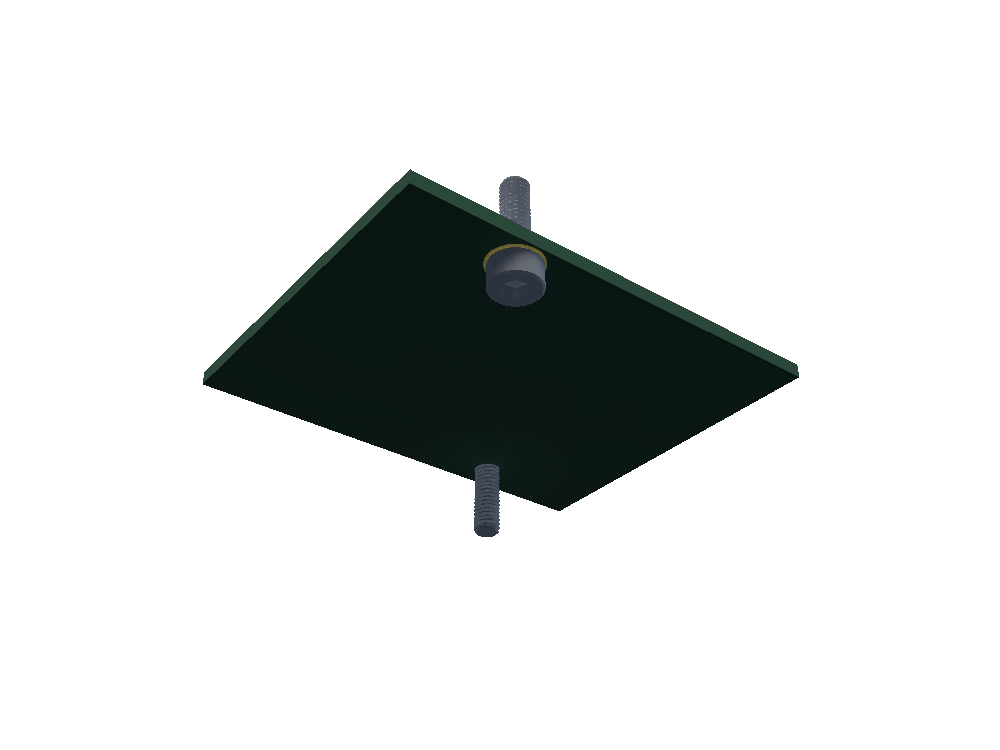
The head's seating plane is the bolt's default mating origin. Socket, hex and pan models place that origin under the head; countersunk models place it at the top of the head. Model strings select the existing modelprinter geometry and modelcdn asset directly.
Choose a head and length
<assembly.bolt
  name="B3"
  diameter="3mm"
  length="10mm"
  headType="socket"
  fastenedTo=".CONTROL > .H1"
/>
headType supports socket (the dimensional default), hex, pan, and countersunk. Length excludes the head for socket, hex and pan; countersunk length includes it. Dimensional bolts use the sizes supported by the corresponding modelprinter model. Socket-head bolts use its standard coarse thread pitch; a different thread or custom geometry requires your own CAD model.
Mechanical holes and mounting faces
For a hole or slot in a mechanical part, author an assembly.referencesurface at its physical seating location, then use a selector such as fastenedTo=".HOUSING > .boltSeat". See the bearing housing example. Imported CAD meshes do not automatically provide named hole datums.
mountGap separates the head from the target along the target's outward normal. mountOffset={{ x: "2mm", y: "-1mm" }} moves along the target face's local tangents; use it to adjust a bolt within a slot. An explicit mountFace selects a custom mating face on the bolt. Ordinary PCB targets also support .top explicitly, for example .CONTROL > .H1 > .top.
References must select one target within the nearest assembly.device. CSS selectors such as .CONTROL > .H1 and compact paths such as CONTROL.H1 work; targets may be declared later. Bolts can be selected by name in assembly explosion stages.
Bolt properties
| Property | Description |
|---|---|
name | Required fastener name. |
model | Canonical modelprinter string, for example hexsocketbolt_m3_l10mm, or a model URL. |
modelUrl, cadModel | Alternative imported CAD source. Supply at most one CAD source. |
diameter, length | Required together when no CAD source is supplied. Distances in mm or unit strings. |
headType | Optional dimensional head style; defaults to socket. |
threadPitch | Optional dimensional pitch in mm or a unit string; must be supported by the selected model. |
fastenedTo | Target PCB hole, hole surface, or named mechanical reference face. |
mountedTo | Alias for fastenedTo. If both are supplied, their trimmed strings must match. |
mountFace | Optional named mating face on this bolt; omitted uses its authored seating origin. |
mountGap | Nonnegative normal clearance, default zero. Requires a target. |
mountOffset | Signed target-local { x?, y? } distances, each defaulting to zero. Requires a target. |
Dimensions, headType, and threadPitch cannot be combined with model, modelUrl, or cadModel. Mounting places the fastener; create the physical hole separately and choose appropriate clearances, thread engagement and countersinks. It does not cut a hole or check collisions.
The examples on this page are validated with tscircuit 0.0.3064.